
How to run an SEO audit, step by step
Free 5 minute read
Who it is for: Anyone with a website address. No account, no card.
To run a technical SEO audit, type your site's address into the box on lalaseo.com, choose how much of the site to crawl and how deep to go, then press Run audit. No account and no card are needed, and a free crawl covers up to 300 pages.
Why it matters
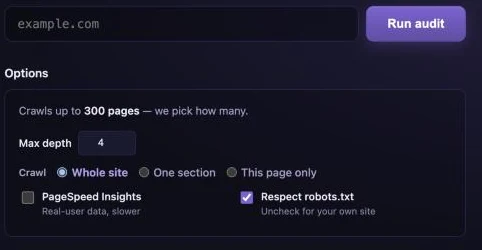
The box takes an address and there are four controls underneath it. Nothing on the page explains what they do, so most people change nothing and never learn what the other settings would have given them.
What to do
-
Go to lalaseo.com and type your site's address into the box.
example.comis enough. A full address such asexample.com/pricingworks too, and the crawl then starts from there rather than from the home page. This is also what the One section list is built from, so enter it first. - Read the line that says it crawls up to 300 pages. It is a statement, not a setting. There is no page-count box. The crawler follows the site until it runs out of pages or reaches the ceiling for your plan. Asking you for a number you cannot know is a question we decided to answer ourselves.
- Choose how much of the site to crawl. Whole site is the default and what almost everyone wants. One section crawls only the pages under one part of the site, which is how you audit /blog without dragging in the shop. This page only does a single page and nothing else.
- Set Max depth, or leave it at 4. How many clicks from the address you entered. Four reaches most of an ordinary site. Raise it for a shop where products sit five or six levels down; drop it to 1 or 2 to sample a large site quickly. On This page only it switches itself off, because there is nothing left to go deeper into.
- Decide about PageSpeed Insights. It is off to start with. Switched on, it adds Google's own speed measurements for the one address you entered, on mobile and on desktop, including real-user figures where Google holds them. It is slower because it is a separate request to Google, and it covers that single page rather than every page.
- Leave Respect robots.txt ticked, unless the site is yours. We read the site's robots.txt and skip whatever it tells our crawler not to fetch. Unticking it on somebody else's site fetches pages their owner asked crawlers to leave alone; on your own site it lets us look at a path robots.txt blocks.
- Press Run audit. A live line naming the page being fetched and how many are done. A small site takes about a minute; a few hundred pages take several.
- Wait. The report opens by itself. The crawl finishes, every finding is re-checked against your live pages, and the report appears. Without an account it is yours to read now; with one it stays in your history so you can compare it later.
What you need before you start
An address. That is the whole list. There is no account to make, no card to enter, no software to install and nothing to connect — you do not need Search Console access, and you do not need to own the site. Type it into the box on the home page, press Run audit, and the crawl starts on our servers. If you want the report kept so you can compare it with next month’s, that is what a free account is for; the audit itself does not need one.
What the usual way costs you
Most guides to running a technical SEO audit are six to fourteen steps long, and they are all describing the same afternoon: install a desktop crawler, configure the crawl speed so it does not flatten the server, export to a spreadsheet, open Search Console in another tab, run key pages through PageSpeed Insights one at a time, then read across the three to work out which findings are real. It is a sound method and there are good reasons to use it — you get total control, no page limit and nothing leaves your machine. The cost is that it takes hours, it has to be repeated by hand every time, and the judgement about what matters is entirely yours.
What the free audit covers, exactly
Up to 300 pages per audit, as many audits as you like, and all 101 checks — the same 101 that run on the most expensive plan. Paying changes how many pages we look at and how often, never the quality of the answer. That is worth stating plainly because it is unusual: among the free audit tools that ask for no sign-up, most will audit a single page, and the ones that crawl a whole site want an account or a card first. If your site is larger than 300 pages the report says how many it reached and how many it did not, so a partial crawl is never handed to you as a complete one. Every check is listed here, and the plans are here if you need more pages or scheduled re-crawls.
When to change the settings
The defaults suit most sites and most people should leave them alone. Three situations are worth the thirty seconds. If you are auditing one part of a large site — a blog inside a shop, say — enter that address and choose One section, and the crawl stays inside it. If you want a read on a single landing page before a call, This page only gives you one in seconds rather than minutes. And if your products sit five or six clicks below the home page, raise Max depth above 4 or the crawl will stop before it reaches them.
How long it takes, honestly
A small brochure site takes about a minute. A few hundred pages takes several. It is not immediate, and we do not pretend it is: the crawler asks your server for every page it reads and it paces itself so that asking does not hurt you. While it runs, a live line names the page being fetched and counts what is done, and the report opens by itself when it finishes. Switching PageSpeed Insights on adds time, because that is a separate request to Google for the one address you entered.
What you get back
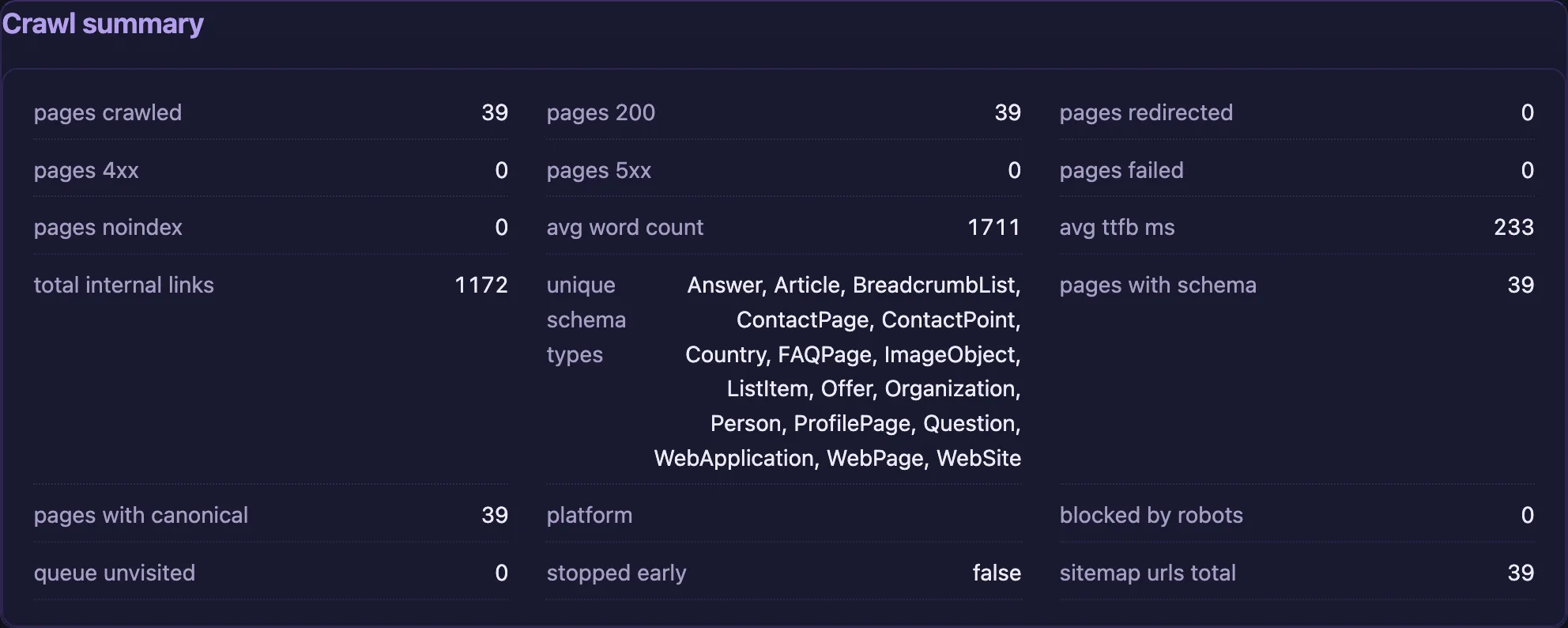
A finished report, and a crawl summary showing exactly what was reached: the pages crawled, the robots.txt and sitemap we read, the redirects followed, and anything we were told to leave alone. A setting that quietly excluded half the site is visible there rather than passing for a clean result.
How to make money from it
Two of the settings change what a prospect's report looks like. This page only gives you a read on a single landing page in seconds rather than minutes, which is what you want ten minutes before a call. One section lets you audit the part of a large site you are actually pitching for, instead of handing somebody 300 pages of noise.
Worth knowing. A free audit covers up to 300 pages per crawl, and you can run as many as you like. If your site is larger than that, the report says how many pages it reached and how many it did not, so you are never shown a partial crawl as a complete one.