
How to read an SEO audit report
Free 6 minute read
Who it is for: Anyone holding a finished audit.
Start with the Critical findings: that is where traffic is actually being lost. Of the 101 checks, 22 can report as critical, so the real list on most sites is short.
Why it matters
A hundred findings is not a plan. Some cost real traffic, some are tidy-ups nobody will ever notice, and from the list alone they look the same. Here is every part of the report and what it is telling you.

What to do
- Triage score — the big number out of 100. It orders your work queue and nothing else. It is our heuristic, not a Google metric, and should never be put in front of a client as one.
- Pages — how many the crawl reached. Compare it with the size of your site. A number far below what you expected means the crawl was stopped by depth, by a scope setting, or by robots.txt.
- Critical, Warning, Info — the three severities. Critical is where traffic is actually being lost: indexing and response problems. Warning is worth doing. Info is context. Start at the left and stop when it stops mattering.
- Runtime — how long the crawl took. Useful mostly as a sanity check. A very long run on a small site is itself a finding about your server.
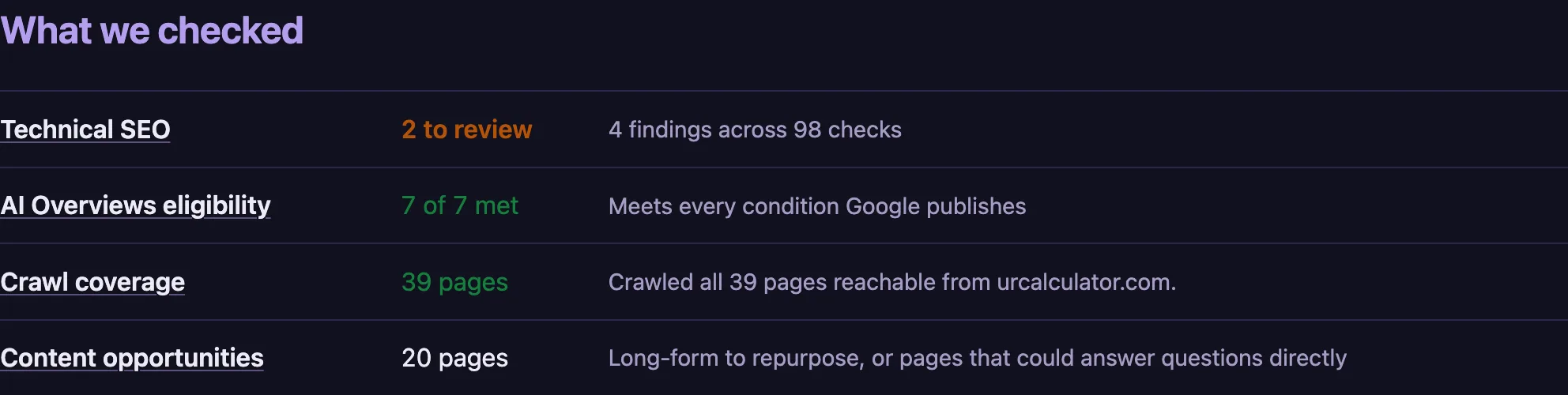
- What we checked — the coverage table. Technical SEO, AI Overviews eligibility, crawl coverage and content opportunities, each with its own result. This is what was tested, not only what failed, so you can see the ground we covered.
- JavaScript — whether we saw the finished page or the one your server sent. Pages built in the browser are re-rendered before being checked, for the first 15 of them in an audit. Any beyond that are listed as unchecked rather than judged: on one real site the served HTML had no heading at all while the rendered page had one, and scoring the first would have been a fault we invented.
- The 19 areas — the breakdown beneath it. Indexing, canonicals, titles, speed, structured data and the rest. Anything under Indexing or Responses is where lost traffic usually lives, so open those first.
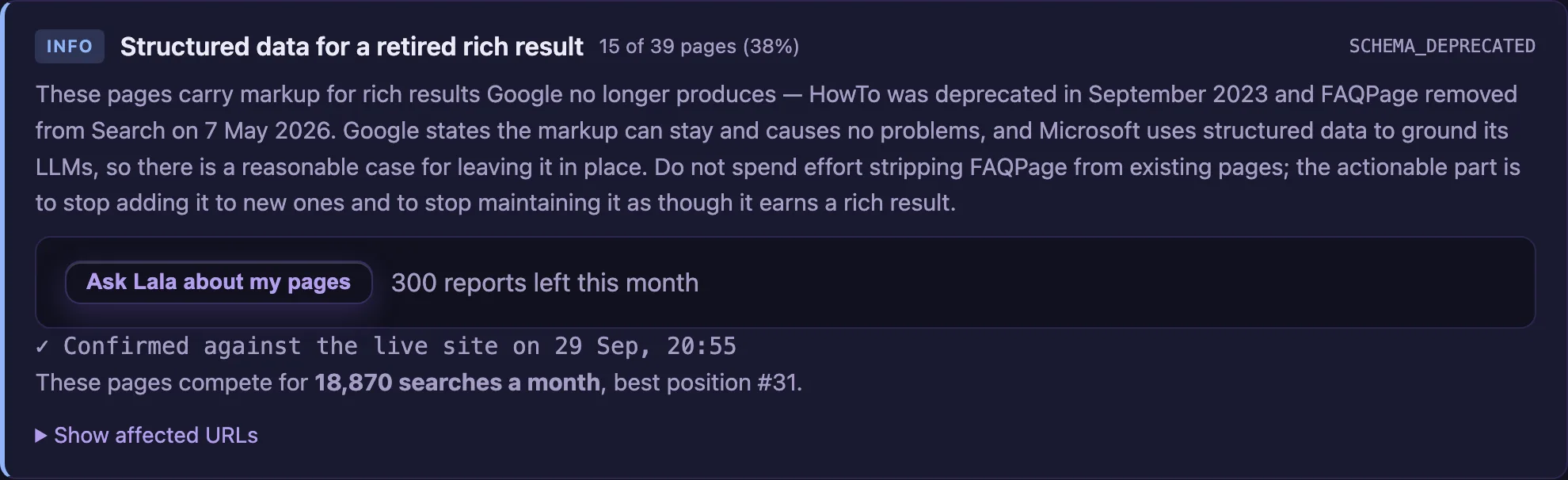
- A finding — one rule, and the pages it was found on. The rule, what it means, why it matters, and the exact addresses. Where the rule comes from Google's documentation, the finding links to the page it came from.
- Confirmed against the live site — the badge on a finding. We went back and re-fetched the page to check the fault was still there, and the badge carries the date and time. A finding without it is one we could not re-reach, and it says so rather than pretending.
- What the crawler got back — the response and speed charts. Status codes across the pages we crawled, and how long your server took to answer. The response time is measured once, quietly, after the crawl — measuring during one inflates it by more than double.
Read it in this order
Critical first, then Warning, then Info, and stop when it stops mattering. Critical means a search engine is being prevented from reaching, reading or indexing something — that is where traffic is actually lost, and of our 101 checks only 22 can ever report at that level, so the list is usually short. Warning is work worth doing. Info is context. Within Critical, open anything under Indexing or Responses before anything else: a page Google cannot fetch or has been told to ignore is earning nothing at all, which no amount of tidying elsewhere makes up for.
What the score is, and what it is not
The number at the top is triage. It exists to order your own work queue, and it is our heuristic — it is not a Google metric, Google publishes no such score, and no tool that shows you one has access to anything Google holds. Use it to compare this month’s crawl of your site with last month’s. Do not put “SEO score: 62/100” in a client deck as though it came from Google, because the claim will not survive the first person who asks where the number comes from.
What “confirmed against the live site” means
Before you are shown a finding, we go back and fetch the page again to check the fault is still there, and the badge carries the date and time we did it. This matters more than it sounds: a crawl is a snapshot, and sending somebody to fix something that was fixed an hour ago costs you their trust. We sample up to 2 pages per finding inside a time budget, so it narrows false positives rather than abolishing them, and a finding we could not re-reach says so instead of quietly claiming it was checked.
When a finding is not a problem
Some are marked advisory, which means we are telling you something true that you may quite reasonably decide not to act on. The clearest example is pages built by JavaScript. We re-render those in a real browser before any check runs, for the first 15 of them in an audit, and the ones past that budget are listed as unchecked rather than judged on HTML we know is incomplete. A page reported that way is not a thin page. It is a page we did not see finished, and those are different things — which is the whole reason this product exists.
What you get back
An ordered queue: the handful of things costing you traffic, then the things worth doing, then the noise. Of our 101 checks only 22 are ever critical, so on most sites the real list is short.
How to make money from it
This is where a quote comes from. Three critical findings across forty pages is a scoped piece of work you can put a number on. A hundred unsorted findings is a conversation that goes nowhere. Quote the critical list, say the rest exists, and charge for the second pass separately.
Worth knowing. The score is triage, not a grade. Putting "SEO score: 62/100" in a client deck invites them to read our heuristic as Google's judgement. It is not, and the claim will not survive being asked where the number comes from.