
How to explain a finding in your SEO audit report
Free 3 minute read
Who it is for: Anyone who knows what is wrong but not what to type.
Open the finding in your report and press the button to have Lala write about your own pages. You get the address, the fault, and what to put instead, in plain English you can paste straight into a ticket.
Why it matters
"Your canonical points at a redirect" names the fault. It does not tell you what to put on line 14 of your own template. The gap between the two is where most SEO advice quietly stops being useful.
What to do
- Open a finding in your report. The universal explanation of that rule: what it means and why it matters. Free, every time, for everyone.
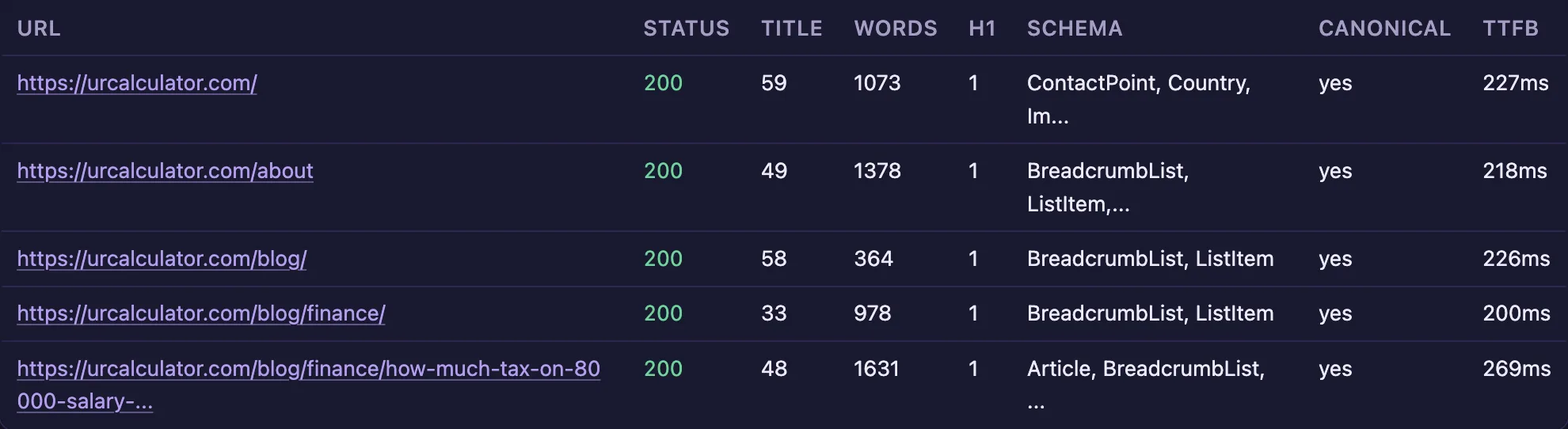
- Look at the pages listed under it. Every address the fault was found on, with what our crawl saw there — the status code, the title length, the word count, the schema. Enough to tell a template problem from a one-page mistake.
- Press the button to have Lala write about your pages. Advice naming your addresses and what is actually on them, rather than a textbook example.
- Check what is left before spending them on trivia. The Usage page shows your remaining site-specific reports for the calendar month.
Why “optimise your canonicals” is not a ticket
Most SEO advice stops one step short of being usable. It names the fault correctly and leaves you to work out what to type, on which line, in which file. If you do the work yourself that is an afternoon of reading. If you are handing it to a developer it is worse, because the thing you pass on is a sentence they cannot act on and will have to come back and ask about. The useful unit is not the finding. It is the instruction that makes the finding go away.
A worked example
Take a canonical tag that points at an address which redirects. The page is nominating a page that says it has moved, so Google is given two answers and picks one itself. The ticket is three lines: point the canonical at the final address, the one that answers 200 without redirecting; check that page’s own canonical points at itself rather than back; and confirm it in the HTML the server sends, not only in what the browser ends up showing. That is what a finding should hand you, and it is what the explanation does — with your addresses in it rather than an example.
What is free and what is metered
The explanation of what a rule means and why it matters is free, every time, for everybody, signed in or not. Advice written about your own pages — your addresses, what is actually on them, what to put instead — costs us money to produce, so it is metered: 3 a calendar month on Free, 25 on Starter, 60 on Growth and 300 on Agency. The Usage page shows what you have left before you spend one on something trivial.
Read it before you send it
It explains; it does not decide. We built it that way deliberately, and the reason is not modesty: a model that decides is a model that will eventually decide something wrong on a client’s site with your name on the ticket. Read what it wrote, agree with it, then send it. The minutes that takes are the cheapest insurance in this whole process.
What you get back
Written advice about your own pages, in plain English, that you can hand to a developer or paste into a ticket without translating it first. The allowance is per calendar month: 3 on Free, 25 on Starter, 60 on Growth, 300 on Agency.
How to make money from it
This is the deliverable. A freelancer's real product is not the finding, it is the instruction that makes the finding go away. Paste it into the client's ticket system under your own name and the work takes minutes rather than an afternoon of research.
Worth knowing. It explains; it does not decide. Read it before you send it. We built it that way deliberately — a model that decides is a model that will eventually decide something wrong on a client's site with your name on it.